The Coral Theme Note Taking Template: A Digital Notebook for Organized Workflows
For professionals, creators, and anyone driven by productivity, the act of note-taking is more than just jotting down ideas. It’s a critical process that organizes thought, captures progress, and drives execution. The Note Taking Template in Coral Theme is designed as a comprehensive digital toolkit that fits directly into this workflow, serving not as a standalone product but as an adaptable component of a larger system for planning and action.
Where the Coral Theme Template Fits in Your Process
Effective workflow management often involves distinct phases: preparation, active execution, review, and archiving. This template is engineered to be fluid across these stages. Before a project begins, its table of contents and undated calendar pages help in structuring goals and timelines. During the creative or work process, the variety of page types—dotted, grid, lined, and column layouts—provides the right canvas for different kinds of information capture, from meeting notes to project sketches. After a task is completed, the organized pages become a reference archive, ensuring that insights and data are preserved for future use or quality control.
The inherent flexibility means it interacts seamlessly with other tools. You might draft a blog post outline on a blank page, then use a two-column page to track research sources and your own commentary. The weekly short note page can integrate with a separate digital calendar app, serving as a rapid weekly log. For educators or trainers, the grid pages can be used to map out lesson plans before transferring the final schedule to a presentation platform.
Core Components and Practical Integration
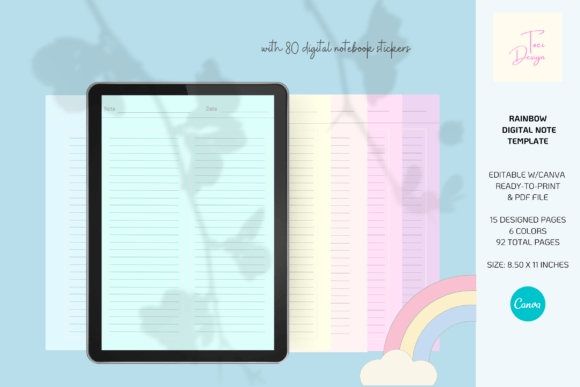
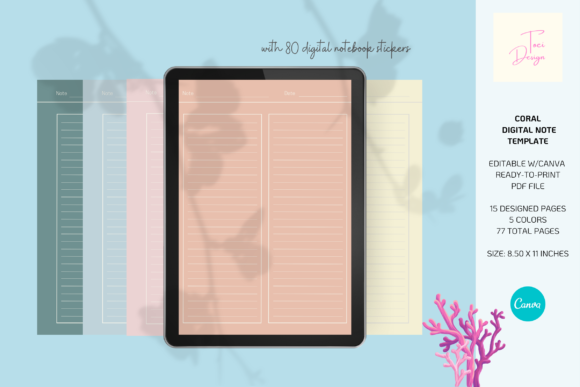
The package includes 90 total pages across 15 designs and 6 colors, providing substantial volume for long-term projects. The 5 color sub-covers offer an immediate method for categorization. A user might assign a different color sub-cover to distinct areas of their work—for example, coral for client projects, blue for personal learning, and green for business development. This visual sorting, combined with the table of content page, creates a navigable system within the notebook itself.
Utilizing the Page Varieties for Specific Workflows
Each page type serves a specific process-oriented function:
- Dotted and Grid Pages: Ideal for the preparation and brainstorming phase. Creators can sketch wireframes or layout ideas; professionals can diagram process flows or organizational charts.
- Line and Lined Pages: The core of active execution for writing meeting minutes, drafting document text, or keeping learning notes during a course.
- Blank Pages: Serve as free-form spaces for post-project reflection, idea synthesis, or visual mind maps that tie together concepts from other sections.
- 2 and 3 Column Pages: Excellent for comparative analysis, tracking multiple data streams (like expenses vs. income), or breaking down complex tasks into sub-tasks, resources, and deadlines.
- Weekly Short Note & Undated Calendar: These pages support ongoing management and review. The weekly page encourages a consistent review habit, while the undated calendar allows for forward planning without being tied to a specific year, making the tool reusable.
The Role of Customization and Supplementary Assets
The fact that this 5-color digital notebook is easily editable with the Canva website application is a significant integration point. Canva’s widespread use among marketers, bloggers, and small business owners means the template doesn’t force a rigid structure. Users can adapt pages to match their existing brand colors, add specific logos for business use, or insert additional instructional text for team-based projects. This compatibility enhances long-term use, as the notebook can evolve with the user’s needs.
The inclusion of 80 notebook stickers in two sets—a printable set for physical use and a digital set for integration into digital planners—extends the template’s functionality. In a practical workflow, these stickers act as rapid visual cues. A freelancer might use a “Priority” digital sticker on a weekly note page to highlight a urgent client revision. An educator could use printable calendar stickers to mark exam dates on the undated calendar before printing the PDF for students. This layer of quick organization supports efficiency and consistency in note-taking habits.
For Entrepreneurs and Small Business Owners
An entrepreneur launching a new product might use the template as a central hub. The front cover is set as the project name. Sub-covers separate market research, financial planning, and launch logistics. Grid pages map out the supply chain, 2-column pages compare competitor features, and the undated calendar tracks the flexible launch timeline. The Canva-editable aspect allows for adding company branding to all pages before sharing the PDF version with team members for alignment.
For Creators and Bloggers
A content creator planning a quarterly series can use the table of contents to list video or article topics. Lined pages are used for scripting, blank pages for visual storyboarding, and the weekly short note page to track publishing deadlines and engagement metrics. The digital PNG stickers can be used directly in a digital planning app to mark completed pieces or ideas for future development, creating a seamless link between the notebook and their content calendar platform.
For Professionals and Freelancers
A consultant managing multiple clients can employ a color-coded system. Each client gets a color sub-cover. Within each section, line pages hold meeting notes, 3-column pages track project milestones, assigned tasks, and status, and dotted pages serve for ad-hoc sketches during client calls. The ready-to-print PDF version is valuable for creating physical copies for on-site workshops, while the digital version remains the primary editable file for ongoing updates.
Ensuring Long-Term Usability and Organization
The provision of both a high-resolution printable PDF and an editable Canva file addresses different long-term needs. The PDF ensures consistent quality control for physical archiving or professional printing if used for KDP (Kindle Direct Publishing) purposes. The digital Canva file guarantees the notebook remains usable and adaptable year after year, preventing obsolescence. The 80 stickers further contribute to sustained organization, offering a familiar set of icons that can be used across multiple iterations of the notebook for consistent tagging.
Integrating the Coral Theme Note Taking Template smoothly into a routine starts with identifying the primary workflow it will support. Select a specific project or goal as a pilot. Customize a few key pages in Canva to match your existing tools—perhaps aligning the color scheme with your other planning software. Then, deliberately use the sticker sets to establish a quick marking system. This initial focused implementation helps the template become a natural part of your process, rather than just another unused digital asset. Its value lies not in being a novel product, but in being a practical, adaptable framework that supports the real work of thinking, planning, and doing.